Blackbird
README
Blackbird v1.1
A fully monome-crow-compatible program card for the Music Thing Modular Workshop Computer.
This enables you to:
Live code with the workshop computer connected to a non-workshop computer running druid
Connect a monome norns via USB and run scripts on norns that interact with crow natively (try awake, buoys, loom ... many of these also allow you do use a monome grid for WS interactions)
Connect the workshop to a non-WS computer running Max MSP or MaxforLive with Ableton and use the monome-built M4L instruments to make the WS interact with Ableton or your own Max creations.
Write and upload your own (simple) program cards in the Lua (5.4.8) language. Upload to the WS computer via the "u" command in druid (on a non-WS computer). Uploaded scripts are saved to flash on the physical card itself- So you can write many different blackbird cards and hot-swap! If you want the name of your patch saved to flash for future reference (printed to host at startup) make the first line of your script start with three hypens
---.[NOTE] Make sure you wait for blackbird to fully start up before attempting to upload a lua script from druid. Startup is complete when welcome messages are printed in druid and the bottom-left LED starts flashing. Sending commands before blackbird is fully online can cause weirdness.
Blackbird does everything monome crow can do and works with all (I hope!) existing crow scripts. It has also been extended with Blackbird-specific functionality via the bb namespace.
A great place to get started is the original crow documentation since the examples there work here perfectly according to the hardware mapping below. More docs linked below.
Also check out the examples directory in this repo for some sample scripts (more to be added soon!)
Tested with druid, norns, MAX/MSP, pyserial - works with ANY serial host that sends compatible strings.
Hardware Mapping
Blackbird maps the Workshop Computer's hardware to crow's inputs and outputs as shown below. Details in the tables that follow.
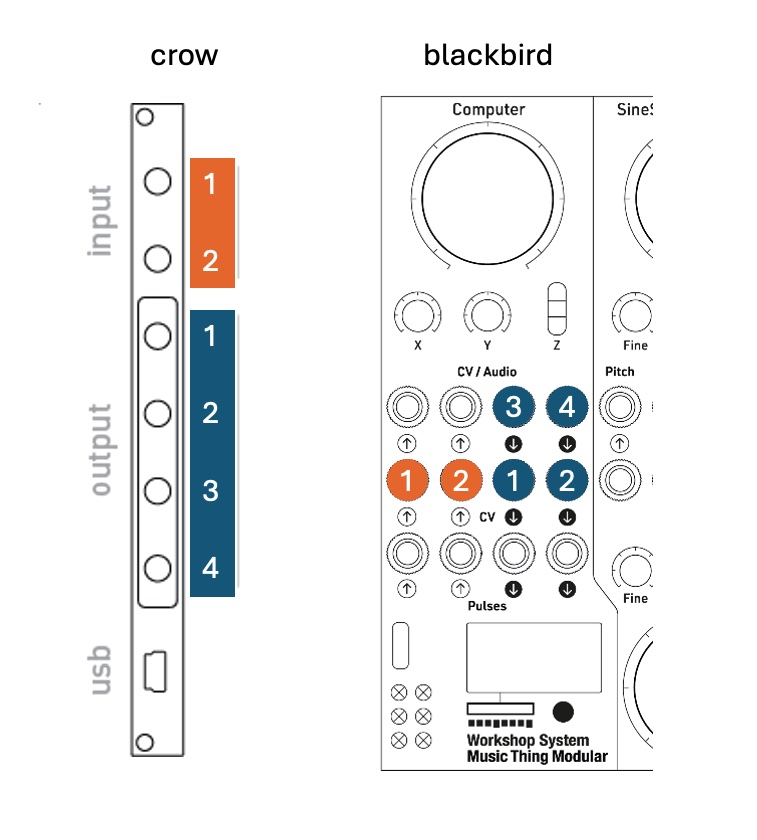
Outputs
| Crow Script | Workshop Computer | Type |
|---|---|---|
output[1] |
CV Out 1 | CV Output (callibrated) |
output[2] |
CV Out 2 | CV Output (callibrated) |
output[3] |
Audio Out 1 | CV/Audio Output (not callibrated) |
output[4] |
Audio Out 2 | CV/Audio Output (not callibrated) |
Inputs
| Crow Script | Workshop Computer | Type |
|---|---|---|
input[1] |
CV In 1 | CV Input |
input[2] |
CV In 2 | CV Input |
Blackbird-Specific Hardware
[NOTE] The WS computer's LEDs always show the positive output voltages for each of the six outputs (negative voltages are not shown).
| Lua API | Workshop Computer | Type |
|---|---|---|
bb.knob.main |
Main Knob | Analog Input |
bb.knob.x |
X Knob | Analog Input |
bb.knob.y |
Y Knob | Analog Input |
bb.switch.position |
3-Position Switch | Digital Input |
bb.audioin[1] |
Audio In L | Audio Input (query only, no detection) |
bb.audioin[2] |
Audio In R | Audio Input (query only, no detection) |
bb.pulsein[1] |
Pulse In 1 | Digital Input (supports change/clock detection) |
bb.pulsein[2] |
Pulse In 2 | Digital Input (supports change/clock detection) |
bb.pulseout[1] |
Pulse Out 1 | Digital Output |
bb.pulseout[2] |
Pulse Out 2 | Digital Output |
Documentation
- Crow Documentation: https://monome.org/docs/crow/
- Crow Script Reference: https://monome.org/docs/crow/reference/
- Bowery crow script repository: https://github.com/monome/bowery
- Lua Documentation: https://www.lua.org/manual/5.4/
- Blackbird-Specific Features: supplementary docs:
How It Works
Blackbird communicates with host applications (druid, norns, Max/MSP) over USB serial by using exactly the same protocol as real crow, and presents itself over USB in such a way that existing hosts don't know the difference between blackbird and crow.
┌─────────────────────────────────────────────────────────────────────┐
│                         HOST APPLICATION                            │
│    (druid / norns / MaxMSP / Python / Anything that speaks serial)  │
└────────────────────────────┬────────────────────────────────────────┘
                             │
                             │ USB Serial Connection
                             │ (Sends: Lua code, commands, queries)
                             │ (Receives: Print output, values, events)
                             ▼
┌────────────────────────────────────────────────────────────────────┐
│                    BLACKBIRD (Workshop Computer)                   │
│                                                                    │
│  ┌──────────────────────────────────────────────────────────────┐  │
│  │ USB Serial Handler                                           │  │
│  │ • Receives commands and code via USB                         │  │
│  │ • Anything with a ^^ prefix is read as a crow command        │  │
│  │ • Anything else is interpreted as lua code                   │  │
│  │ • Newline character '\n' tells system packet is complete.    │  │
│  │ • multi-line chunks can be sent between triple back-ticks ```│  │
│  │ • Sends responses and print() output back to host            │  │
│  └───────────────────┬──────────────────────────────────────────┘  │
│                      │                                             │
│                      ▼                                             │
│  ┌──────────────────────────────────────────────────────────────┐  │
│  │ Lua Script Execution                                         │  │
│  │ • Runs code sent from USB host OR loaded from flash memory   │  │
│  │ • Manages timing (metros, clocks)                            │  │
│  │ • Controls outputs via ASL actions and direct voltage        │  │
│  │ • Monitors inputs and fires user-defined lua callbacks       │  │
│  └───────────────────┬──────────────────────────────────────────┘  │
│                      │                                             │
│                      ▼                                             │
│  ┌──────────────────────────────────────────────────────────────┐  │
│  │ Hardware I/O interaction via Chris Johnson's ComputerCard.h  │  │
│  │ • Inputs/outputs/knobs/switch                                │  │
│  └──────────────────────────────────────────────────────────────┘  │
│                                                                    │
└────────────────────────────────────────────────────────────────────┘
Other Blackbird-specific goodness
Noise Generation
Audio-rate noise action with bb.noise() - generates noise directly in the audio loop for clean, efficient noise generation on any CV/Audio output. Optional paramater sets the noise level between 0.0 (silence) and 1.0 (full vol, default).
Example:
output[4]( bb.noise() )

--OR

output[2].action = bb.noise(0.5) -- define action
output[2]() -- run the action
Define an 'ASAP' function
bb.asap - Run code as fast as possible in the control thread with no detection. Useful for updating parameters smoothly with knobs. Use carefully as if you do much in here then performance will be impacted.
Only runs if it exists. To clear/stop this function use bb.asap = nil
Example:
bb.asap = function()
    myParameter = bb.knob.main
end
Check which inputs are plugged in
Check if inputs are connected with bb.connected - Query whether a cable is plugged into any input jack. This uses the Workshop Computer's built-in normalization probe hardware to detect physical cable presence.
Available for all six input jacks:
bb.connected.cv1/bb.connected.cv2- CV inputsbb.connected.pulse1/bb.connected.pulse2- Pulse inputsbb.connected.audio1/bb.connected.audio2- Audio inputs
Returns true if a cable is plugged in, false if the jack is empty.
Example:
-- optionally attenuate an incoming voltage with a knob,
-- but use the knob if nothing is plugged in
bb.asap = function()
  myparameter = bb.knob.main
  if bb.connected.cv1 then
    myparameter = myparameter * input[1].volts
  end
end
Performance characteristics
Blackbird uses a dual-core architecture optimized for responsive, jitter-free output:
- Core 1 (audio thread): Outputs CV slopes sample-by-sample at 9.6kHz for zero-jitter precision
- Core 0 (control thread): Processes Lua scripts, metros, and ASL actions with ~1ms latency
- Timer callbacks (metros, ASL triggers) are processed in 8-sample blocks for optimal balance between responsiveness and CPU efficiency
This architecture provides excellent timing accuracy for musical applications while maintaining stability even under heavy scripting loads.
Credits & Thank yous
Written by Dune Desormeaux / @dessertplanet, 2025
Special thanks to:
- Tom Whitwell for the Workshop System
- Chris Johnson for the ComputerCard framework
- Brian Crabtree and Trent Gill (monome & Whimsical Raps) for the original crow and the open source crow firmware
- Zack Scholl (infinitedigits) for encouragement and proving Lua can work on RP2040 with his midi-to-cv project
- Ben Regnier (Q*Ben) for extensive testing, feedback, and hard work on porting bowery scripts over to bbbowery
License
GPLv3 or later - see LICENSE file for details.
Known Issues
A few things that are on the radar but that I don't plan to fix (at least not now). If you think any of them are dealbreakers please file a github issue and we can debate!
- Setting
clock.tempoabove 500 bpm can cause crashes. Slow down! - Running scripts with references to the
iitable produces harmless (but chatty) lua nil global errors. Ideally these would be silent until/unless i2c support is somehow added/defined for an alleged eurorack-computer-only-future-module. - System does not prevent receipt of serial comms during startup that are known to cause issues. This is doc'd in the overview but could be prevented in code entirely in a future version.
- Wobblewobble norns script doesn't play nice with blackbird as is. I think the solution is to turn down the frequency that supercollider is triggering output.volts message dispatch in the norns-side code but this is untested.